How Can We Help?
Gate Setup
Gate setup is critical for managing access control and ensuring the security of your premises. Follow these steps and set up all the activity gates efficiently, especially if you have multiple gates in the location. (Entry /Exit /Both / Large)
- Access the Gate Setup Page Navigate to the following URL:https://portal.koyyo.co/manage-gate/
- To “Configuration->Gate Setup” to manage your business sites.
- Go to “Add Gate” option and add your business site.
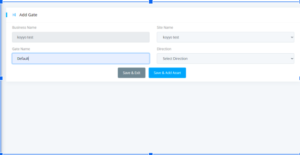
- Add Gate using your business information like Business name, Site name, Gate name, and Direction ( IN, OUT, BOTH ).
- Once the gate setup is complete, monitor gate activity through the dashboard. Keep track of entry and exit logs, monitor traffic flow, and you can address any issues or discrepancies as per requirement.